
How to Set Up Cloaking for the Tromblexan Offer: Launching Ads in Ukraine

In the highly competitive media buying industry, launching nutra offers requires a comprehensive approach. It is not enough to simply choose a product, prepare an ad creative, and send traffic to a landing page. It is important to consider the specifics of the GEO, target audience, advertising platforms, and the affiliate program itself.
For arbitrageurs working with nutra, a combination of a quality advertising account and properly configured infrastructure allows them to manage traffic more efficiently, analyze results, and scale successful campaigns.
In this guide, we will explore how to prepare an advertising funnel for the Tromblexan Low Price (UA) nutra offer from ENSO TRAFFIC, set up Cloaking.House , and which parameters are important to consider when launching ads in the Ukrainian GEO.
Cloaking Mechanics: How Does It Work?
Essentially, cloaking is a traffic routing system. It allows you to define traffic processing rules and determine which page will be displayed to a user depending on the parameters of their visit.

Different pages are used within the advertising infrastructure:
White Page: A page with information that does not violate advertising platform rules.
Offer Page: The landing page of the partner product to which targeted traffic is directed.
Cloaking.House allows you to configure routing between pages and take traffic parameters into account.
This approach helps media buyers:
Organize advertising infrastructure for different offers.
Configure GEO and other traffic parameters.
Control the performance of advertising funnels.
Analyze visits and filter triggers.
Separate campaigns by traffic sources and conditions.
Why Arbitrageurs Choose Specialized Solutions
When working with nutra offers, it is important to test different advertising funnels quickly and avoid spending extra time on technical server configuration.
Specialized platforms help organize this part of the work in one interface.
Key advantages:
Cloud architecture: There is no need to maintain complex server infrastructure for managing routes yourself.
Built-in AI White Page Generator: The ability to create informational pages using AI directly in the dashboard.
Deep traffic segmentation: Filtering by GEO, devices, operating systems, browsers, ISP, VPN / Proxy, and other parameters.
Advertising funnel management: You can create separate Flows for different offers and traffic sources.
Click analytics: View traffic parameters and filter triggers.
PHP integration: Connect the service to your own domain.
7-day free trial: The opportunity to test the service functionality before launching a paid campaign.
This is especially relevant for the nutra vertical when working with multiple GEOs, offers, and traffic sources.
The Tromblexan Offer: What We Are Configuring the Advertising Funnel For
Before launching ads, it is important to study the specifics of the particular offer. A universal setup that works for one product may not always be optimal for another.
In our case, we will be looking at configuring the setup for the Tromblexan Low Price (UA) nutra offer from ENSO TRAFFIC.

The offer is focused on the Ukrainian GEO, so when preparing an advertising campaign, it is necessary to consider the target audience, product specifics, and affiliate network requirements.
What to Consider When Launching
GEO: Ukraine.
Vertical: Nutra.
Target audience: 30–65 years old.
Average age of a confirmed lead: 50 years old.
Traffic sources: Facebook, Google, Instagram, TikTok, native advertising, and teaser networks.
Landing page: Provided.
These parameters help form the foundation of the advertising funnel and understand what to pay attention to during setup.
Why It Is Important to Consider the Specifics of the Offer
Tromblexan is designed for an audience for whom clear product information, landing page usability, and proper advertising material presentation are important.
Therefore, before launching, it is worth checking:
Does the page match the offer's topic?
Is the design suitable for the target audience?
Does the landing page work correctly on mobile devices?
Is the selected advertising source allowed?
Are the affiliate program's requirements for creatives and landing pages being met?
Thus, the Cloaking.House setup will be carried out not in the abstract, but for a specific Tromblexan advertising funnel targeting the Ukrainian GEO.
5 Steps to Launch Your Cloaking
In this section, we will show how to set up Cloaking.House for the Tromblexan Low Price (UA) nutra offer.
1. Create a White Page
First, prepare an informational page that matches the product's topic and the requirements of the traffic source. One option is to use the AI White Page Generator inside Cloaking.House.

When creating the page, you can choose a suitable topic, language, and structure. For the Tromblexan campaign, it is important that the content corresponds to the actual product and does not contain unsubstantiated medical claims.
Create a relevant informational page.
Check the text and design.
Make sure the page displays correctly on mobile devices.
Upload the generated file to the root folder of your domain on the hosting.
Important: If you use PHP integration with Cloaking.House, the informational page file must be placed according to the service instructions. In a typical setup, you can rename index.html to site.html so that the main index.php file handles traffic processing.
2. Set Up Traffic Routes (Flows)
After preparing the page, go to the Flows section in the dashboard. Here, you need to create a separate funnel for Tromblexan.

Add the prepared white page, specifying the file name and the “Load” method.
Specify the offer page provided by the partner and the “Redirect” method.
Save the Flow.
As a result, you will have a separate advertising funnel that can be used to test a campaign in Ukraine.
During setup, it is important to check that the pages and routing comply with the requirements of the traffic source and ENSO TRAFFIC.
3. Set Filters for the Ukrainian GEO
Now we move on to traffic filtering parameters. Since Ukraine is the primary GEO for Tromblexan, the geographic targeting of the advertising campaign must be taken into account in the Flow settings.
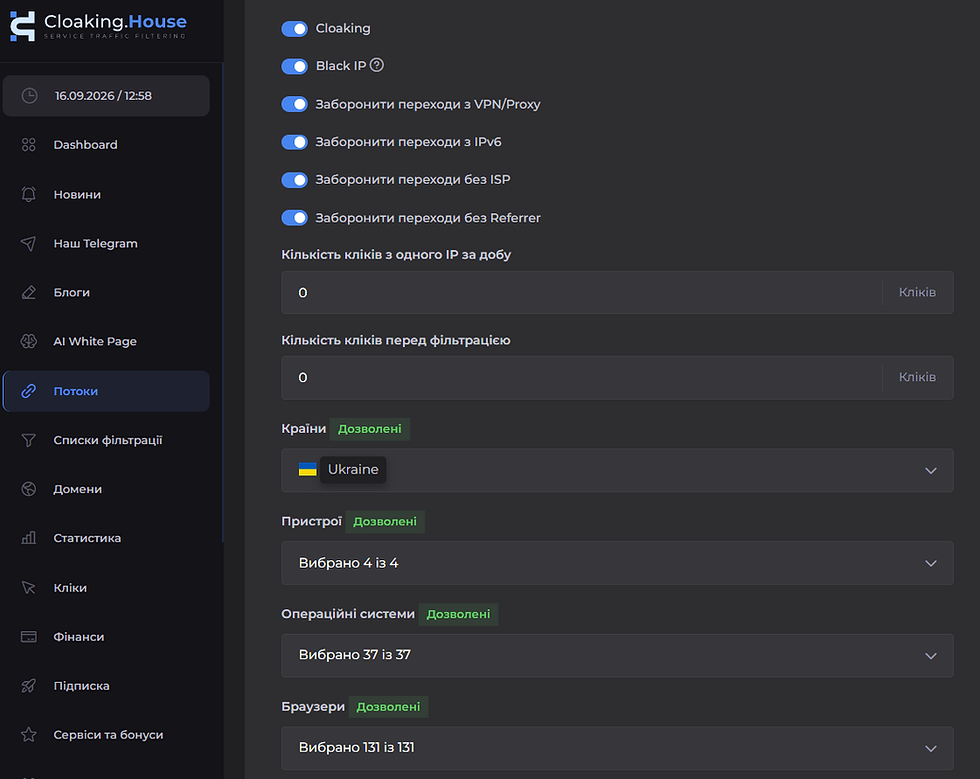
Main parameters:
GEO: Ukraine.
Devices.
Operating systems.
Browsers.
ISP.
VPN / Proxy.
Language.
Referrer.
For example, if you are launching ads for a Ukrainian audience, it is important to check that visits from the required GEO are processed correctly and that no routing errors occur.
4. Integrate the System Core
After setting up the Flow, you need to integrate the cloaking system.

If you use PHP integration:
Download the unique index.php file from the Cloaking.House dashboard.
Upload it to the root directory of your domain.
Make sure the required informational page is located nearby.
Check that the integration is working correctly.
Perform test visits.
This file connects your domain to the cloud-based filtering engine of Cloaking.House.
Before launching ads, it is important to make sure that all pages open correctly and that visits are recorded in analytics.
5. Analyze and Scale
After launching the Tromblexan campaign, you need to monitor not only the number of clicks but also the quality of traffic.

In the Clicks section, you can analyze:
Number of visits.
Click processing result.
Triggered filter.
GEO.
IP.
Language.
ISP.
Referrer.
User-Agent.
Device.
OS.
Browser.
These data help you understand how the advertising funnel works and which parameters require additional configuration.
If you see a large number of visits but few leads, you should check not only the filters, but also the landing page itself, creatives, order form, and whether the traffic matches the offer's conditions.
Summary
Launching the Tromblexan nutra offer requires attention to GEO, audience, traffic sources, and technical infrastructure.
In this case, it is important not simply to configure Cloaking.House, but to prepare it for a specific offer:
Ukrainian GEO.
Audience aged 30–65.
Allowed traffic sources.
Suitable landing page.
Correct filters.
Visit and lead analytics.
Cloaking.House helps cover the technical part of the advertising funnel, while ENSO TRAFFIC provides offers for working with Ukrainian traffic and beyond.
If you are planning to launch nutra campaigns, start by studying the offer conditions, preparing advertising materials, and configuring the infrastructure. After that, test the funnel, analyze the results, and scale successful variations.
Bonus: Use promo code ENSO to get a 30% discount on Cloaking.House plans.


Comments